KiwiH743-Wing Flight Controller
Overview
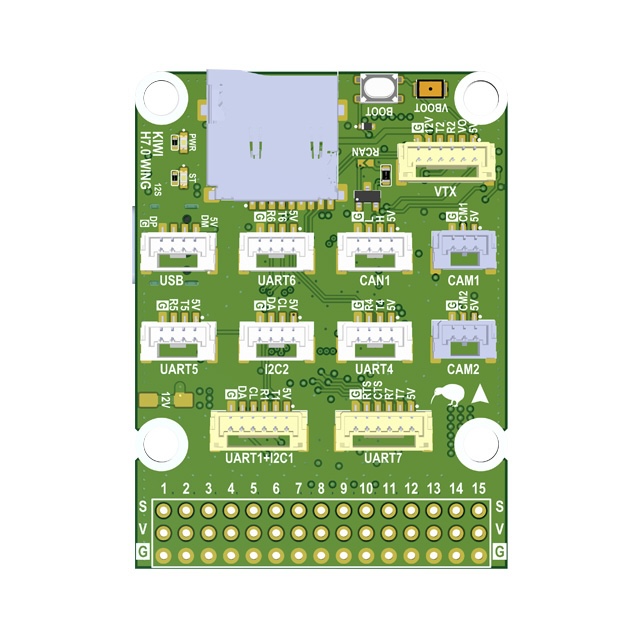
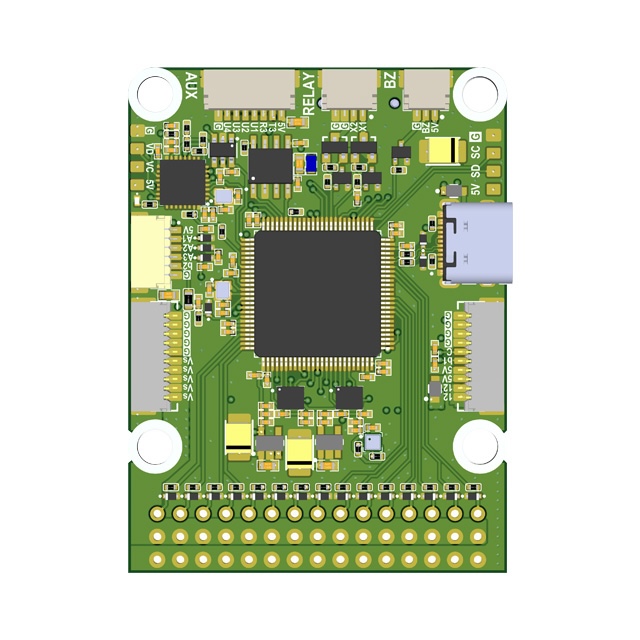
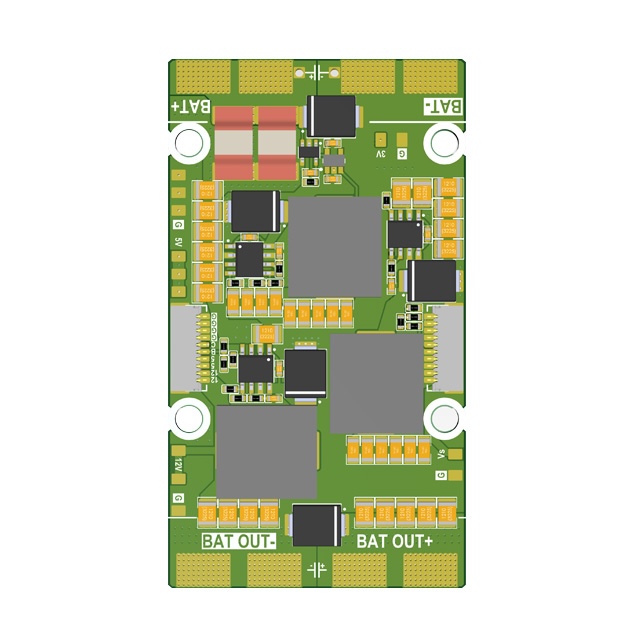
The KiwiH743-Wing is a Pixhawk-format flight controller system consisting of two boards: a Flight Controller and a Power Distribution Board (PDB). Designed for expendable quadcopters and long-range fixed-wing drones. Ready to use with Rover, Wing, Quadcopter, and Hexacopter configurations.
Premium features: GPS-less takeoff, IRC Tramp VTX control, VRX integration (TBS Fusion, Skyzone Steadyview), wind override from GCS.
Firmware
| Firmware | Version | Updated | Download |
|---|---|---|---|
| ArduPilot 4.7 | 4.7.1-dev (e28ab786) | 2026-11-04 | KiwiH743-wing-4.7.zip |
| ArduPilot 4.6 | 4.6.3-dev (1c2b6336) | 2026-11-03 | KiwiH743-wing.zip |
| ArduPilot 4.5 | 4.5.7-dev (92ab05ca) | 2026-11-03 | KiwiH743-wing-4.5.zip |
| ArduPilot 4.7 (no IMU CLKIN) | 4.7.1-dev (e28ab786) | 2026-11-04 | KiwiH743-wing-noclkin-4.7.zip |
| ArduPilot 4.6 (no IMU CLKIN) | 4.6.3-dev (1c2b6336) | 2026-11-03 | KiwiH743-wing-noclkin.zip |
| ArduPilot 4.5 (no IMU CLKIN) | 4.5.7-dev (92ab05ca) | 2026-11-03 | KiwiH743-wing-noclkin-4.5.zip |
| INAV 9.1 | 9.1.1-dev (6944bd5c) | 2026-10-14 | KiwiH743-wing-inav.zip |
| Betaflight | — | — | TBD |
Three ArduPilot branches are maintained in parallel: 4.5 (Plane-4.5.7 LTS), 4.6 (current), and 4.7. Pick the one that matches your fleet.
The no IMU CLKIN builds are an A/B test control with the external 32.768 kHz IMU clock disabled — IMUs run on their internal oscillators. Same APJ_BOARD_ID, loads with the same bootloader.
The INAV zip contains the .hex (target KIWIH743WING) plus the target sources and a README — flash the hex via the INAV Configurator “Load Firmware [Local]” button.
Previous versions
| Firmware | Version | Updated | Download |
|---|---|---|---|
| ArduPilot 4.7 | 4.7.1-dev (e7bf0731) | 2026-09-22 | KiwiH743-wing-4.7-2026-09-22.zip |
| ArduPilot 4.7 | 4.7.1-dev (4776a3fb) | 2026-09-04 | KiwiH743-wing-4.7-2026-09-04.zip |
| ArduPilot 4.6 | 4.6.3-dev (50cd24bd) | 2026-10-29 | KiwiH743-wing-2026-10-29.zip |
| ArduPilot 4.6 | 4.6.3-dev (3a7e5083) | 2026-10-14 | KiwiH743-wing-2026-10-14.zip |
| ArduPilot 4.6 | 4.6.3-dev (e4a1d2cc) | 2026-06-26 | KiwiH743-wing-2026-06-26.zip |
| ArduPilot 4.6 | 4.6.3-dev (5436f451) | 2026-05-20 | KiwiH743-wing-2026-05-20.zip |
| ArduPilot 4.5 | 4.5.7-dev (a6bb8227) | 2026-08-20 | KiwiH743-wing-4.5-2026-08-20.zip |
| ArduPilot 4.5 | 4.5.7-dev (0edb016a) | 2026-06-28 | KiwiH743-wing-4.5-2026-06-28.zip |
| ArduPilot 4.5 | 4.5.7-dev (79b1a19b) | 2026-06-20 | KiwiH743-wing-4.5-2026-06-20.zip |
| ArduPilot 4.6 (no IMU CLKIN) | 4.6.3-dev (50cd24bd) | 2026-10-29 | KiwiH743-wing-noclkin-2026-10-29.zip |
| ArduPilot 4.6 (no IMU CLKIN) | 4.6.3-dev (5436f451) | 2026-05-15 | KiwiH743-wing-noclkin-2026-05-15.zip |
Features
- STM32H743 MCU (480 MHz, 2 MB flash)
- 12S power supply
- 5V, 6/7V, 9/12V 5A BECs
- ICM-42688P and ICM-45686 with power and hardware signal filtering
- BMP388 barometer
- Dual camera input, switchable
- 12 PWM outputs + 3 GPIO/PINIO outputs (servo 13-15)
- 5 UARTs, UART7 with flow control
- 1 SPI, 1 I2C, FDCAN
- 5 GPIOs, 2 relay outputs, 9/12V switch
- Analog + digital VTX output
- STM32G4 OSD
- SD card via SDMMC
- 40 x 42 mm board, 36 x 39 mm mounting holes
Technical Specifications
Processor
| Parameter | Value |
|---|---|
| MCU | STM32H743 |
| Architecture | ARM Cortex-M7 |
| Max Frequency | 480 MHz |
| Flash | 2048 KB (2 MB) |
| Crystal | 16 MHz external oscillator |
Sensors
| Sensor | Part | Notes |
|---|---|---|
| IMU 1 | ICM-42688P | External clock, hardware filtered |
| IMU 2 | ICM-45686 | Hardware filtered |
| Barometer | BMP388 | |
| OSD | STM32G4 | Analog video overlay |
Power
| Rail | Voltage | Current |
|---|---|---|
| Input | 12S (up to ~50V) | |
| BEC 1 | 5V | 5A |
| BEC 2 | 6/7V | 5A |
| BEC 3 | 9/12V | 5A |
Mechanical
| Parameter | Value |
|---|---|
| Board size | 39 x 39 mm |
| Mounting holes | 30.5 x 30.5 mm |
Serial Ports
Ports without DMA fall back to interrupt + FIFO and are not deterministic at high baud.
| Serial | UART | TX Pin | RX Pin | DMA RX | DMA TX | Notes |
|---|---|---|---|---|---|---|
| Serial 1 | USART1 | PB14 | PB15 | NODMA | DMA | Low-rate only (≤115 k) |
| Serial 2 | USART2 | PD5 | PD6 | NODMA | NODMA | Low-rate only (≤115 k) |
| Serial 3 | USART3 | PD8 | PD9 | NODMA | DMA | Low-rate only (≤115 k) |
| Serial 4 | UART4 | PD1 | PD0 | DMA exclusive | DMA exclusive | ★ Rank 1 high-baud — first choice |
| Serial 5 | UART5 | PB13 | PB12 | NODMA | DMA | Low-rate only (≤115 k) |
| Serial 6 | USART6 | PC6 | PC7 | NODMA | DMA | Low-rate only (≤115 k) |
| Serial 7 | UART7 | PE8 | PE7 | DMA exclusive | DMA exclusive | ★ Rank 2 high-baud; RTS PE9, CTS PE10 |
| Serial 8 | UART8 | PE1 | PE0 | NODMA | DMA | OSD UART |
High-baud MAVLink ports
For peripherals that need >115 k baud (e.g. ELRS+MAVLink, RTK GPS+MAVLink), use the DMA-backed UARTs:
| Rank | Serial | UART | TX Pin | RX Pin | Notes |
|---|---|---|---|---|---|
| 1 | Serial 4 | UART4 | PD1 | PD0 | First choice for any high-baud peripheral |
| 2 | Serial 7 | UART7 | PE8 | PE7 | Second choice. RTS/CTS wired — tie peripheral CTS to GND, or set BRD_SER7_RTSCTS = 0 |
Default firmware already sets SERIAL7_PROTOCOL = MAVLink2 on the Wing, so for a second high-baud link just set SERIAL7_BAUD = 460.
Connectors and Wire Colors
Port connection diagram for cable assembly. Pin order in each connector matches the silkscreen labels on the board, read left to right.
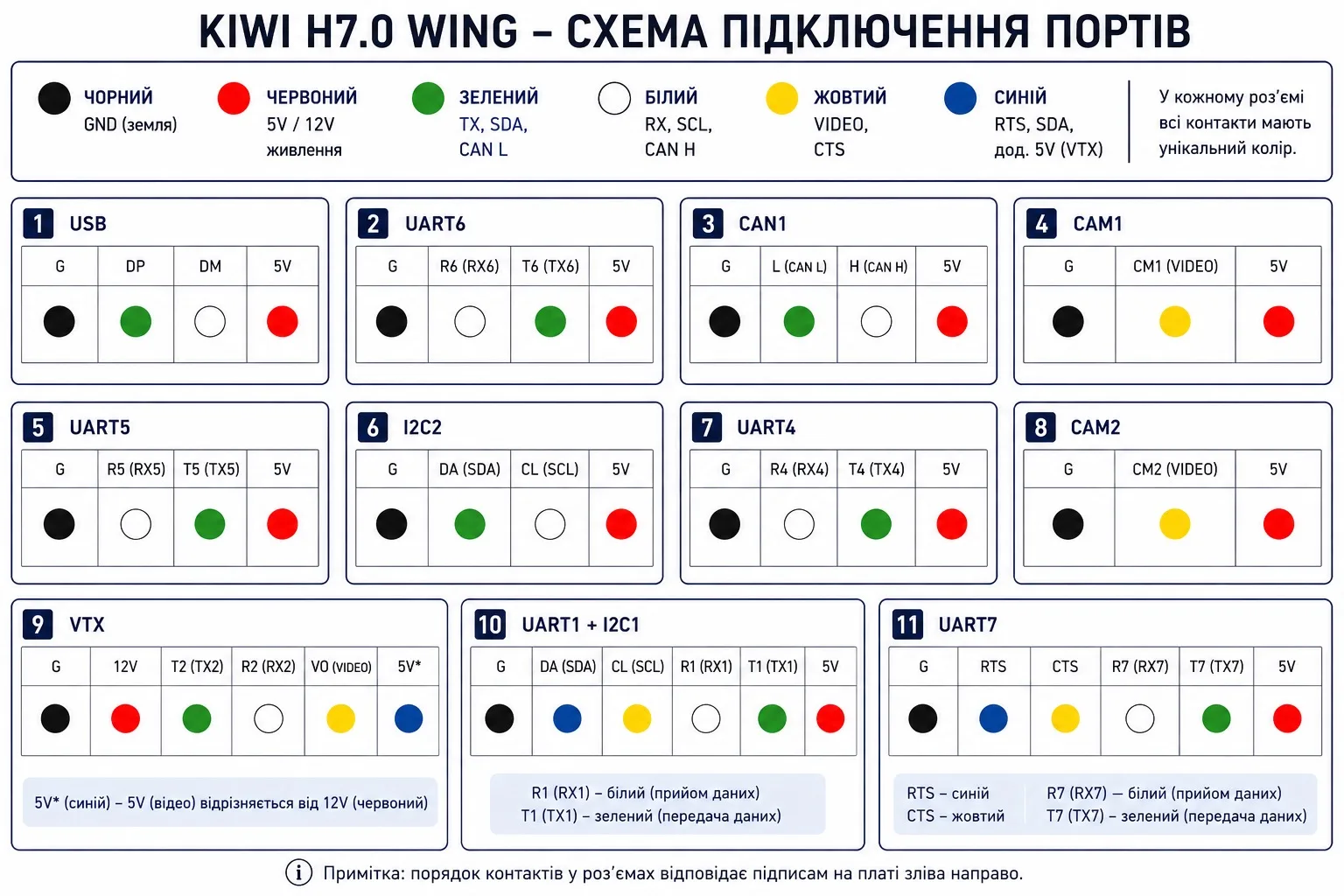
| Port | Pin Order | Wire Colors |
|---|---|---|
| USB | G, DP, DM, 5V | Black, Green, White, Red |
| UART6 | G, R6, T6, 5V | Black, White, Green, Red |
| CAN1 | G, L, H, 5V | Black, Green, White, Red |
| CAM1 | G, CM1, 5V | Black, Yellow, Red |
| UART5 | G, R5, T5, 5V | Black, White, Green, Red |
| I2C2 | G, SDA, SCL, 5V | Black, Green, White, Red |
| UART4 | G, R4, T4, 5V | Black, White, Green, Red |
| CAM2 | G, CM2, 5V | Black, Yellow, Red |
| VTX | G, 12V, T2, R2, VO, 5V | Black, Red, Green, White, Yellow, Blue |
| UART1 + I2C1 | G, SDA, SCL, R1, T1, 5V | Black, Blue, Yellow, White, Green, Red |
| UART7 | G, RTS, CTS, R7, T7, 5V | Black, Blue, Yellow, White, Green, Red |
Wire Color Legend
| Color | Signal |
|---|---|
| Black | Ground (GND) |
| Red | Power (5V / 12V) |
| Green | TX, CAN L, SDA |
| White | RX, CAN H, SCL |
| Yellow | Video (VO/CM) or CTS |
| Blue | RTS or auxiliary signal (used for the second power wire on the VTX cable) |
Note: Wire colors are intended to simplify cable assembly and connector identification. Signal names printed on the PCB always take precedence over wire color. On the VTX cable,
5Vis the video 5V rail (blue) — distinct from12V(red).
AUX, RELAY and ADC Connectors (bottom side)
Three JST-SH 1 mm connectors on the bottom of the FC board. Pin order follows the silkscreen next to each connector.
AUX (8-pin). 3.3 V logic straight from the MCU, no driver, no series resistor. 5V is a supply output.
| Silk | Signal | MCU pin | ArduPilot |
|---|---|---|---|
| G | GND | ||
| U4 | AUX4 GPIO | PC14 | GPIO 108 |
| U3 | AUX3 GPIO | PE5 | GPIO 107 |
| U2 | AUX2 GPIO | PB3 | GPIO 106 |
| U1 | AUX1 GPIO | PD7 | GPIO 105 |
| R3 | UART3 RX | PD9 | SERIAL3 |
| T3 | UART3 TX | PD8 | SERIAL3 |
| 5V | 5 V out |
U1-U4 are outputs, low at boot. Use them with RELAYn_PIN=105/106/107/108 and RELAYn_FUNCTION=1. From Lua, use gpio:write(105, 1). All six ArduPilot relays have a default pin, so free one first. Example: RELAY6_PIN=105 if servo 15 is not needed as GPIO.
RELAY (4-pin). Two high-side switched power outputs from the board’s 12 V rail (9 V when the rail is set to 9 V). Each output is a P-channel MOSFET (IRLML5203) driven through a level shifter with a 10 k gate pulldown. The output is off while the MCU is in reset or unprogrammed. Off = open circuit, not 0 V. Rate each output at 2 A continuous.
| Silk | Signal | Control pin | ArduPilot |
|---|---|---|---|
| G | GND | ||
| G | GND | ||
| X2 | switched 12 V | PD4, GPIO 102 | RELAY3 (RELAY3_PIN=102, default) |
| X1 | switched 12 V | PD3, GPIO 101 | RELAY2 (RELAY2_PIN=101, default) |
The X1/X2 connector pins are the same outputs as the RELAY 1 / RELAY 2 pads listed under GPIOs, Relays, and AUX.
ADC (6-pin). Analog inputs, each with an ESD diode and 100 nF to ground. A1-A3 are 0 to 3.3 V direct. B2 is a battery voltage input with a 100 k / 5.1 k divider, ratio 20.6. Full scale 3.3 V is about 68 V at the pin. 5V is a supply output.
| Silk | Signal | MCU pin | ADC | ArduPilot pin |
|---|---|---|---|---|
| G | GND | |||
| B2 | battery 2 voltage, divider 20.6:1 | PC3 | ADC1 ch13 | 13 |
| A3 | analog in, 0-3.3 V | PC2 | ADC1 ch12 | 12 |
| A2 | analog in, 0-3.3 V | PC0 | ADC1 ch10 | 10 |
| A1 | analog in, 0-3.3 V | PC1 | ADC1 ch11 | 11 |
| 5V | 5 V out |
Second battery monitor on B2: set BATT2_MONITOR=3, the firmware defaults BATT2_VOLT_PIN=13 and BATT2_VOLT_MULT=20.6 (firmware after 2026-10-14). A1/A2/A3 suit an analog airspeed sensor (ARSPD_PIN=11) or RSSI (RSSI_TYPE=1, RSSI_ANA_PIN=10).
GPIOs, Relays, and AUX
Dedicated GPIO Pads
| Pad | Pin | GPIO | Default | ArduPilot Relay Config |
|---|---|---|---|---|
| CAM SW | PE2 | 100 | RELAY1 | RELAY1_PIN=100 (hwdef default) |
| RELAY 1 | PD3 | 101 | RELAY2 | RELAY2_PIN=101 (default, enabled) |
| RELAY 2 | PD4 | 102 | RELAY3 | RELAY3_PIN=102 (default, enabled) |
| AUX 1 | PD7 | 105 | Output LOW | — |
| AUX 2 | PB3 | 106 | Output LOW | — |
| AUX 3 | PE5 | 107 | Output LOW | — |
| AUX 4 | PC14 | 108 | Output LOW | U4 on AUX connector (firmware after 2026-10-14) |
| VID NRST | PE3 | 104 | Input PULLUP | RELAY6_PIN=104, inverted (takes RELAY6 from servo 15) |
| CAN SIL | PE4 | 70 | Output LOW | CAN silent mode |
| BUZZER | PA15 | 32 | Alarm | — |
| LED | PD11 | 90 | Status LED | — |
Note: pad silkscreen numbers and ArduPilot relay numbers are off by one. ArduPilot RELAY1 is the camera switch (
RELAY1_PIN=100, PE2, hwdef default). Pad RELAY 1 (PD3) is ArduPilot RELAY2, pad RELAY 2 (PD4) is ArduPilot RELAY3. Both are enabled by default, off at boot. RELAY4-6 default to servo outputs 13-15, see below. RELAY 1/2 pads are 9/12V switched outputs.
PWM Outputs
| Output | Pin | GPIO | Timer | Function | DShot Bidir |
|---|---|---|---|---|---|
| SERVO 1 | PA10 | 50 | TIM1_CH3 | Motor 1 | Yes |
| SERVO 2 | PA9 | 51 | TIM1_CH2 | Motor 2 | Yes |
| SERVO 3 | PA8 | 52 | TIM1_CH1 | Motor 3 | Yes |
| SERVO 4 | PD15 | 53 | TIM4_CH4 | Servo 1 | No |
| SERVO 5 | PD14 | 54 | TIM4_CH3 | Servo 2 | No |
| SERVO 6 | PD13 | 55 | TIM4_CH2 | Servo 3 | No |
| SERVO 7 | PD12 | 56 | TIM4_CH1 | Servo 4 | No |
| SERVO 8 | PB1 | 57 | TIM3_CH4 | Servo 5 | No |
| SERVO 9 | PB0 | 58 | TIM3_CH3 | Servo N | No |
| SERVO 10 | PB4 | 59 | TIM3_CH1 | Servo N | No |
| SERVO 11 | PB5 | 60 | TIM3_CH2 | Servo N | No |
| SERVO 12 | PA3 | 61 | TIM5_CH4 | Servo N | No |
| SERVO 13 | PA2 | 62 | TIM5_CH3 | GPIO, RELAY4 | No |
| SERVO 14 | PA1 | 63 | TIM5_CH2 | GPIO, RELAY5 | No |
| SERVO 15 | PA0 | 64 | TIM5_CH1 | GPIO, RELAY6 | No |
Any PWM pin can be turned into a GPIO with SERVOn_FUNCTION=-1 + RELAYn_PIN=<gpio>. Reboot after changing the function.
Bidirectional DShot (ESC RPM telemetry) is available on outputs 1–3 (TIM1). Enable with SERVO_BLH_BDMASK=7 and use DShot300/600 on those outputs.
Servo 13-15 as GPIO (PINIO)
Servo outputs 13, 14 and 15 ship as GPIO outputs, not PWM. The firmware defaults set SERVO13-15_FUNCTION = -1 and map the pins to RELAY4-6, off at boot.
| Output | Pin | GPIO | Relay | RC switch | Relay index (MAVProxy / Lua / DO_SET_RELAY) |
|---|---|---|---|---|---|
| SERVO 13 | PA2 | 62 | RELAY4 | RCx_OPTION = 36 | 3 |
| SERVO 14 | PA1 | 63 | RELAY5 | RCx_OPTION = 66 | 4 |
| SERVO 15 | PA0 | 64 | RELAY6 | RCx_OPTION = 67 | 5 |
Signal level is 3.3 V through a 220 R series resistor, active high. The pin drives up to 15 mA, enough for a logic input or an opto, not for a coil.
To drive one from a transmitter switch, put the option value on an RC channel, for example RC9_OPTION = 36 for RELAY4 on servo 13. Switch low (< 1200 us) = off, high (> 1800 us) = on.
param set RC9_OPTION 36     # RC9 switches RELAY4 (servo 13)
relay set 3 1               # RELAY4 ON from MAVProxy
relay set 3 0               # RELAY4 OFF
To get a PWM output back, set SERVOn_FUNCTION to the wanted function and RELAYn_FUNCTION = 0. No firmware rebuild is needed.
Pyrotechnic and one-shot loads
These three outputs are the ones to use for a parachute, cutter or other load that must never see a stray pulse:
- The bootloader drives them low from the first milliseconds. The firmware presets the output latch low. There is no pulse during startup or relay init.
- The pins are high impedance only while the MCU is held in reset or in DFU mode. If the load input is a bare MOSFET gate with no pulldown, fit a pulldown at the load. Use 4.7 k to 100 k from signal to GND. A module with an opto input, a base resistor or its own pulldown does not need it. Check with a meter: resistance from the module input to GND below 1 M means a pulldown is there.
- Keep
RELAYn_DEFAULT = 0. Value 2 restores the last state after a reboot and can re-fire the load. - Do not change
SERVO13-15_FUNCTIONon a channel wired to a pyro load. A servo function puts 50 Hz pulses on the pin.
For a parachute, prefer the built-in parachute function over a raw relay switch. It adds the disarmed lockout, CHUTE_ALT_MIN and a timed pulse instead of a held level:
param set RELAY4_FUNCTION 3   # Parachute on servo 13
param set CHUTE_ENABLED 1
param set CHUTE_TYPE 10        # relay
param set RC9_OPTION 22        # parachute release switch
Relay Usage
MAVProxy:
relay set 0 1    # RELAY1 ON (CAM SW HIGH)
relay set 0 0    # RELAY1 OFF
relay set 1 1    # RELAY2 ON (RELAY1 pad HIGH)
Mission waypoint: DO_SET_RELAY — relay number 0-based (0=RELAY1), setting 1=ON / 0=OFF.
Lua:
relay:toggle(0)  -- toggle RELAY1 (CAM SW)
relay:on(1)      -- RELAY2 ON (RELAY1 pad)
relay:off(1)     -- RELAY2 OFF
All GPIO pads default LOW on boot. Use RELAY_DEFAULT params to set initial state.
OSD Reset (RELAY6):
RELAY6 defaults to servo output 15. To use it for the STM32G4 OSD reset line (VID NRST) instead, point it at GPIO 104. Active low — set RELAY6_INVERTED=1 so that “relay on” pulls the line low (reset) and “relay off” releases it.
param set RELAY6_PIN 104
param set RELAY6_FUNCTION 1
param set RELAY6_INVERTED 1
relay set 5 1   # reset OSD
relay set 5 0   # release reset
Power Monitoring
| Function | Pin | ADC |
|---|---|---|
| Battery voltage | PC5 | ADC1 IN8, scale /21 |
| Battery current | PC4 | ADC1 IN4 |
| VBAT2 | PC3_C | ADC3 IN1, scale /21 |
| ADC 1 | PC1 | ADC1 IN11 |
| ADC 2 | PC0 | ADC1 IN10 |
| ADC 3 | PC2_C | ADC3 IN0 |
Current
| Parameter | Value | Notes |
|---|---|---|
BATT_MONITOR | 4 | Analog Voltage and Current |
BATT_AMP_PERVLT | 45.45 | Sensor calibration |
Sensor Calibration
| Parameter | ArduPilot | Betaflight |
|---|---|---|
| Voltage scale | BATT_VOLT_MULT = 21.0 | voltage_meter_scale = 210 |
| Current scale | BATT_AMP_PERVLT = 45.45 | current_meter_scale = 100 |
Battery Voltage Thresholds (ArduPilot)
| Parameter | 6S | 8S | 12S |
|---|---|---|---|
| Full charge | 25.2 V | 33.6 V | 50.4 V |
BATT_ARM_VOLT | 22.2 | 29.6 | 44.4 |
BATT_LOW_VOLT | 21.0 | 28.0 | 42.0 |
BATT_CRT_VOLT | 19.8 | 26.4 | 39.6 |
Buses
SPI
| Bus | CLK | MISO | MOSI | Usage |
|---|---|---|---|---|
| SPI 1 | PA5 | PA6 | PA7 | IMU 1 (CS: PB2) |
| SPI 4 | PE12 | PE13 | PE14 | IMU 2 (CS: PE15) |
I2C
| Bus | SCL | SDA |
|---|---|---|
| I2C 1 | PB6 | PB7 |
| I2C 2 | PB10 | PB11 |
FDCAN
| Function | Pin |
|---|---|
| CAN RX | PB8 |
| CAN TX | PB9 |
| CAN Silent | PE4 |
SDMMC (SD Card)
| Function | Pin |
|---|---|
| D0 | PC8 |
| D1 | PC9 |
| D2 | PC10 |
| D3 | PC11 |
| CLK | PC12 |
| CMD | PD2 |
Premium Features
GPS-less Takeoff (ArduPlane)
KIWI firmware supports autonomous takeoff without a GPS fix. Useful for hand launch or catapult deployment in GPS-denied environments.
Parameters:
| Parameter | Value | Description |
|---|---|---|
FLIGHT_OPTIONS | 32768 | Enable GPS-less takeoff |
ARMING_CHECK | 0 | Disable arming checks |
TKOFF_ALT | 50 | Target takeoff altitude (meters) |
TKOFF_THR_MINACC | 0 | No accelerometer trigger, timer only |
TKOFF_THR_MINSPD | 0 | No minimum ground speed required |
TKOFF_THR_MAX | 100 | Max throttle % during takeoff |
TKOFF_THR_DELAY | 2 | Delay before launch (0.2s) |
Procedure:
- Power on, wait for EKF convergence
- Set home (from GPS before loss, or manually via MAVLink)
- Arm in FBWA mode
- Switch to TAKEOFF mode
IRC Tramp VTX Control
Full IRC Tramp protocol support under ArduPilot. Change VTX power, band, channel, and pit mode directly from your GCS or OSD — no need for SmartAudio.
Works with TBS Unify, Rush Tank, and other Tramp-compatible VTXs.
VRX Integration (TBS Fusion / Skyzone)
Working video receiver control under ArduPilot. Supports:
- TBS Fusion — band/channel tracking via CRSF
- Skyzone Steadyview — auto channel sync
Wind Override from GCS
The GCS can set the wind that the autopilot uses for dead reckoning. This helps in GPS-denied flight, where the EKF cannot learn the wind by itself. Available in ArduPilot 4.6 firmware, all vehicles.
The GCS sends the MAVLink message WIND (#168) to the autopilot:
| Field | Use |
|---|---|
direction | Direction the wind blows FROM, degrees (0-360) |
speed | Wind speed, m/s. A value less than 0.001 turns the override off |
speed_z | Ignored |
Behavior:
- The autopilot applies the wind to the EKF3 (all lanes) and to DCM within 1 s.
- The autopilot reports the wind that it uses in its outgoing
WINDmessage. The GCS can compare this value with the set value. - The EKF continues to refine the wind from airspeed or sideslip data, if available. The set value is the start point.
- The autopilot sends a status text:
Wind override 270 deg 8.0 m/s (sysid/compid)orWind override off (sysid/compid). - If the GCS sends no
WINDmessage, the autopilot operates as standard ArduPilot. - The override stays active until the GCS turns it off or the EKF resets. After a reboot, the GCS must send the wind again.
Example (pymavlink):
m.mav.wind_send(270.0, 8.0, 0.0)   # wind from 270 deg at 8 m/s
m.mav.wind_send(0.0, 0.0, 0.0)     # override off
The autopilot accepts
WINDfrom any system ID. If other autopilots share the same MAVLink network, setSYSID_ENFORCE 1so that the autopilot accepts commands only from its GCS (SYSID_MYGCS).
Camera Gimbal Support
KiwiH743-Wing supports camera gimbals out of the box — both servo-based and MAVLink protocol gimbals (CADDX GM3 V2 and compatible).
MAVLink Gimbal
Wire gimbal UART to any free serial port (gimbal TX → FC RX, gimbal RX → FC TX, GND).
| Param | Value | Notes |
|---|---|---|
SERIALx_PROTOCOL | 2 | MAVLink2 |
SERIALx_BAUD | 115 | 115200 bps |
MNT1_TYPE | 6 | Gremsy (reboot after setting) |
MNT1_PITCH_MIN | -120 | GM3 V2 spec: ±120° |
MNT1_PITCH_MAX | 120 | |
MNT1_YAW_MIN | -160 | GM3 V2 spec: ±160° |
MNT1_YAW_MAX | 160 | |
MNT1_RC_RATE | 60 | deg/s for rate control, 0 for angle |
RC Control
Assign RC channels to control gimbal axes:
| Param | Value | Notes |
|---|---|---|
RC6_OPTION | 213 | Mount1 Pitch |
RC7_OPTION | 214 | Mount1 Yaw |
RC8_OPTION | 212 | Mount1 Roll (3-axis gimbals only) |
Example: with MNT1_RC_RATE=60, moving the RC6 stick deflects pitch at 60°/s. Set MNT1_RC_RATE=0 for direct angle control (stick position = gimbal angle).
Gimbal firmware must be V2.0 or higher.
Servo Gimbal
Connect pitch/yaw servos to any Servo PWM outputs (SERVO 9–SERVO 15).
| Param | Value | Notes |
|---|---|---|
MNT1_TYPE | 1 | Servo |
SERVOx_FUNCTION | 6 | Mount1 Pitch (assign to desired output) |
SERVOx_FUNCTION | 8 | Mount1 Yaw (assign to desired output) |
MNT1_PITCH_MIN | -90 | |
MNT1_PITCH_MAX | 90 | |
MNT1_YAW_MIN | -170 | |
MNT1_YAW_MAX | 170 | |
MNT1_RC_RATE | 60 | deg/s for rate control, 0 for angle |
Displayport OSD
HD OSD via MSP Displayport on SERIAL8 (OSD UART). Compatible with DJI O3, HDZero, Walksnail.
param set OSD_TYPE 5
param set OSD_UNITS 0
param set MSP_OPTIONS 4
param set MSP_OSD_NCELLS 0
param set SERIAL8_BAUD 115
param set SERIAL8_OPTIONS 0
param set SERIAL8_PROTOCOL 42
OSD under INAV
The onboard STM32G4 OSD is a character OSD driven over MSP DisplayPort on UART8, the same link ArduPilot uses. INAV draws a 30x16 character grid onto the analog video.
How it works:
- INAV opens UART8 as an MSP DisplayPort port (function
MSP DisplayPortin the Ports tab, 115200 baud). osd_video_systemdefaults toBF43COMPAT, which matches the font built into the OSD module. INAV draws all symbols, the artificial horizon and the direction arrows with that font.- Font upload from the INAV Configurator is not used on this board. Keep the OSD module’s built-in font.
Factory defaults, applied on defaults or first boot:
| Setting | Value | Purpose |
|---|---|---|
| UART8 function | MSP DisplayPort, 115200 | OSD link |
osd_video_system | BF43COMPAT | Matches the OSD module font, 30x16 grid |
feature OSD | on | Enables the OSD task |
Equivalent CLI, if the settings were changed or a config from another board was loaded:
serial 7 33554432 115200 115200 0 115200
set osd_video_system = BF43COMPAT
feature OSD
save
Options you may want to change:
| Setting | Values | Notes |
|---|---|---|
osd_video_system | BF43COMPAT (default), AUTO, PAL, NTSC | Keep BF43COMPAT. AUTO or PAL use the INAV font layout and show letters instead of the horizon line. NTSC gives 30x13. |
osd_row_shiftdown | 0 to 1 | Moves all elements down one row when the top row is cut off by the camera. Not needed with the layout below. |
osd_units | METRIC, METRIC_MPH, IMPERIAL, UK, GA | Display units. |
osd_msp_displayport_fullframe_interval | deciseconds, default 10 | How often INAV resends the whole screen. Raise it only if the link is noisy. |
osd_ahi_style | DEFAULT, LINE | Horizon drawing style. |
osd_crosshairs_style | DEFAULT, AIRCRAFT, … | Centre marker. Off in the factory layout. |
Element positions are set in the Configurator OSD tab or with osd_layout. The layout below keeps every element inside columns 1 to 28 and rows 1 to 12 so nothing is lost to analog overscan. Column and row are zero based, V is visible, H is hidden:
osd_layout 0 14 2 1 V      # satellites
osd_layout 0 0 7 1 V       # RSSI
osd_layout 0 24 13 1 V     # heading
osd_layout 0 1 22 1 V      # battery voltage
osd_layout 0 15 22 3 V     # altitude
osd_layout 0 26 22 4 V     # vertical speed
osd_layout 0 13 22 5 V     # ground speed
osd_layout 0 3 8 6 V       # artificial horizon
osd_layout 0 9 2 6 V       # throttle
osd_layout 0 11 2 7 V      # current
osd_layout 0 12 2 8 V      # mAh used
osd_layout 0 10 2 9 V      # VTX channel
osd_layout 0 22 14 9 V     # home arrow
osd_layout 0 7 2 10 V      # flight mode
osd_layout 0 23 13 10 V    # home distance
osd_layout 0 28 20 11 V    # on time / fly time
osd_layout 0 30 1 12 V     # messages
Checks in the CLI:
status
The OSD: line must read MSP DisplayPort: DJI Compatability mode [30 x 16]. Any other OSD line means the port function or osd_video_system was changed.
VTX control under INAV uses IRC Tramp on UART2 (function VTX Tramp). Only the two Tramp bands that overlap the module’s factory table are reachable from INAV: INAV band A is vendor band I, INAV band E is vendor band K. Power levels are 25 mW, 2 W and 4 W.
Flight Controller
Built around the STM32H743, the flight controller provides dual IMUs with hardware signal filtering, dual switchable camera inputs, and relay-controlled power outputs.
Power Distribution Board (PDB)
Features
- 4S–12S power input
- 5V 5A output
- 5/6/7/9V 5A adjustable output
- 12V 5A output
- 3.3V 1A output
- 0.1 mOhm current sensor
- 36 x 39 mm mounting holes
- 42 x 75 mm board dimensions
Other
| Function | Pin | Notes |
|---|---|---|
| USB D- | PA11 | |
| USB D+ | PA12 | |
| SWDIO | PA13 | Debug |
| SWDCLK | PA14 | Debug |
| Buzzer | PA15 | TIM2 CH1 |
| LED | PD11 | Status |
| IMU clock | PE6 | TIM15 CH2, external clock for IMUs |
| Video NRST | PE3 | OSD/VTX reset |
| Video BOOT | PC13 | Shared with AUX 4 |
Full Pinout Reference
Port A (PA)
| Pin | Function | Alternate |
|---|---|---|
| PA0 | SERVO 15 | TIM5 CH1 |
| PA1 | SERVO 14 | TIM5 CH2 |
| PA2 | SERVO 13 | TIM5 CH3 |
| PA3 | SERVO 12 | TIM5 CH4 |
| PA4 | IMU 1 INT | |
| PA5 | SPI 1 CLK | |
| PA6 | SPI 1 MISO | |
| PA7 | SPI 1 MOSI | |
| PA8 | SERVO 3 | |
| PA9 | SERVO 2 | |
| PA10 | SERVO 1 | |
| PA11 | USB N | |
| PA12 | USB P | |
| PA13 | SWDIO | |
| PA14 | SWDCLK | |
| PA15 | BUZZER | TIM2 CH1 |
Port B (PB)
| Pin | Function | Alternate |
|---|---|---|
| PB0 | SERVO 9 | |
| PB1 | SERVO 8 | ADC1 IN5 |
| PB2 | IMU 1 CS | |
| PB3 | AUX 2 | |
| PB4 | SERVO 10 | |
| PB5 | SERVO 11 | |
| PB6 | I2C 1 SCL | |
| PB7 | I2C 1 SDA | |
| PB8 | FDCAN RX | TIM16 CH1 |
| PB9 | FDCAN TX | TIM17 CH1 |
| PB10 | I2C 2 SCL | |
| PB11 | I2C 2 SDA | |
| PB12 | Serial 5 RX | |
| PB13 | Serial 5 TX | |
| PB14 | Serial 1 TX | |
| PB15 | Serial 1 RX |
Port C (PC)
| Pin | Function | Alternate |
|---|---|---|
| PC0 | ADC 2 | ADC1 IN10 |
| PC1 | ADC 1 | ADC1 IN11 |
| PC2_C | ADC 3 | ADC3 IN0 |
| PC3_C | VBAT2 / 21 | ADC3 IN1 |
| PC4 | ESC CURR | ADC1 IN4 |
| PC5 | VBAT / 21 | ADC1 IN8 |
| PC6 | Serial 6 TX | TIM3 CH1 |
| PC7 | Serial 6 RX | TIM3 CH2 |
| PC8 | SDMMC D0 | TIM3 CH3 |
| PC9 | SDMMC D1 | TIM3 CH4 |
| PC10 | SDMMC D2 | |
| PC11 | SDMMC D3 | |
| PC12 | SDMMC CK | |
| PC13 | VIDEO BOOT / AUX 4 |
Port D (PD)
| Pin | Function | Alternate |
|---|---|---|
| PD0 | Serial 4 RX | |
| PD1 | Serial 4 TX | |
| PD2 | SDMMC CMD | |
| PD3 | RELAY 1 | |
| PD4 | RELAY 2 | |
| PD5 | Serial 2 TX | |
| PD6 | Serial 2 RX | |
| PD7 | AUX 1 | |
| PD8 | Serial 3 TX | |
| PD9 | Serial 3 RX | |
| PD11 | LED | |
| PD12 | SERVO 7 | TIM4 CH1 |
| PD13 | SERVO 6 | TIM4 CH2 |
| PD14 | SERVO 5 | TIM4 CH3 |
| PD15 | SERVO 4 | TIM4 CH4 |
Port E (PE)
| Pin | Function | Alternate |
|---|---|---|
| PE0 | Serial 8 RX | |
| PE1 | Serial 8 TX | |
| PE2 | CAMERA SWITCH | |
| PE3 | VIDEO NRST | |
| PE4 | FDCAN SILENT | |
| PE5 | AUX 3 | TIM15 CH1 |
| PE6 | IMU CLK IN | TIM15 CH2 |
| PE7 | Serial 7 RX | |
| PE8 | Serial 7 TX | |
| PE9 | Serial 7 RTS | |
| PE10 | Serial 7 CTS | |
| PE11 | IMU 2 INT | TIM1 CH2 |
| PE12 | SPI 4 CLK | TIM1 CH2 |
| PE13 | SPI 4 MISO | TIM1 CH3 |
| PE14 | SPI 4 MOSI | TIM1 CH4 |
| PE15 | IMU 2 CS |